

prefect server start. View and filter logs in the UI or
access log records through the API.
When you run a flow, Prefect automatically logs events for flow runs and task runs, along with any custom
log handlers you have configured. No configuration is needed to enable Prefect logging.
For example, if you create a simple flow in flow.py and a local flow run with python flow.py, you’ll
see an example of the log messages created automatically by Prefect:
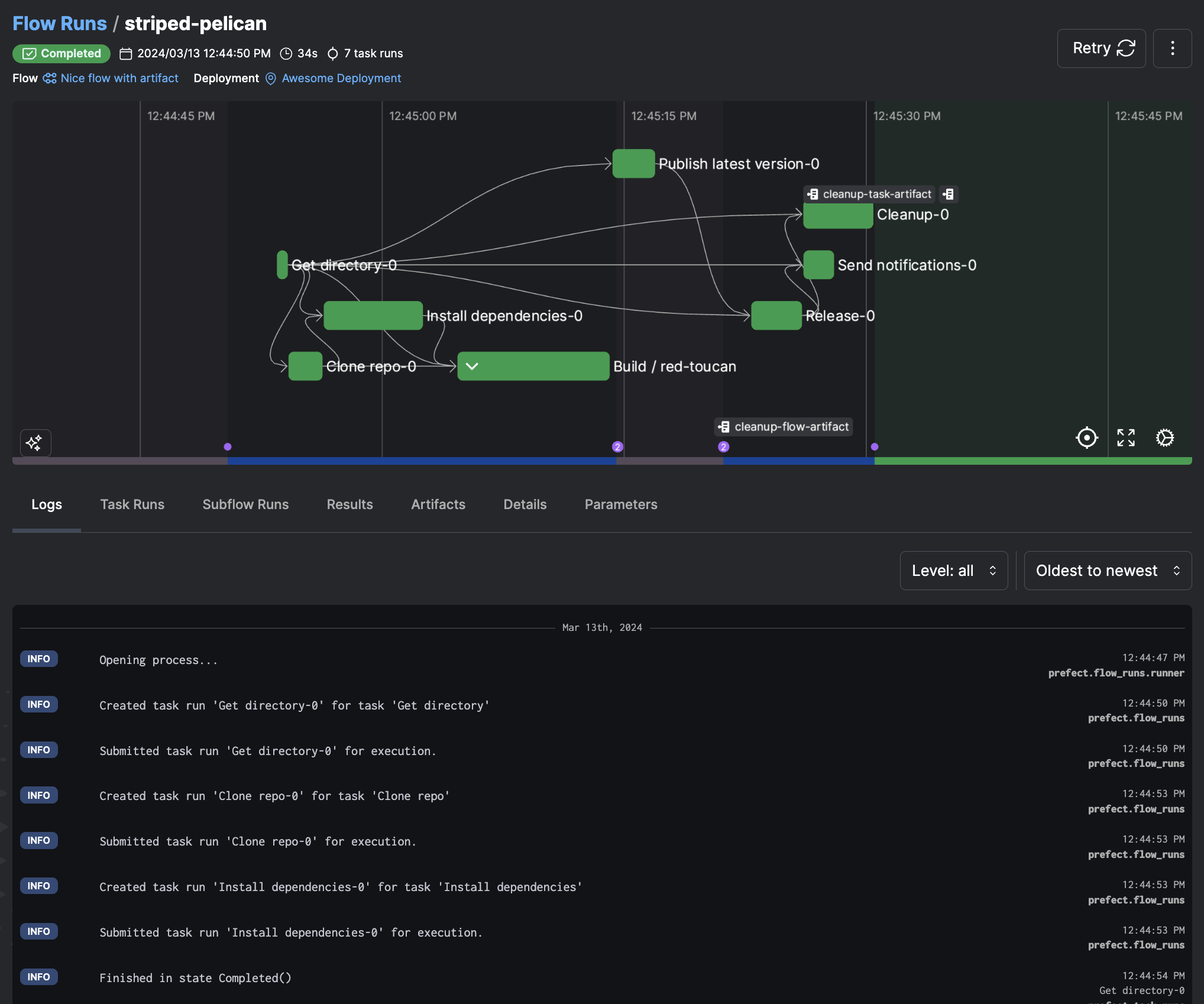 These log messages reflect the logging configuration for log levels and message formatters. Customize the log
levels captured and the default message format through configuration, and capture custom logging events by explicitly
emitting log messages during flow and task runs.
Prefect supports the standard Python logging levels
These log messages reflect the logging configuration for log levels and message formatters. Customize the log
levels captured and the default message format through configuration, and capture custom logging events by explicitly
emitting log messages during flow and task runs.
Prefect supports the standard Python logging levels CRITICAL, ERROR, WARNING, INFO, and DEBUG. By default,
Prefect displays INFO-level and above events. Configure the root logging level as well as specific logging levels
for flow and task runs.
Logging configuration
Prefect provides several settings to configure logging level and loggers. By default, Prefect displaysINFO-level and above logging records. Change this level to DEBUG and see DEBUG-level
logs created by Prefect as well. You may need to change the log level used by loggers from other libraries to see their log records.
Override any logging configuration by setting an environment variable or Prefect profile
setting using the syntax PREFECT_LOGGING_[PATH]_[TO]_[KEY], with [PATH]_[TO]_[KEY] corresponding to the nested address
of any setting.
For example, to change the default logging levels for Prefect to DEBUG, set the environment variable
PREFECT_LOGGING_LEVEL="DEBUG".
You may also configure the “root” Python logger. The root logger receives logs from all loggers unless they
explicitly opt out by disabling propagation. By default, the root logger is configured to output WARNING level logs
to the console. As with other logging settings, you can override this from the environment or in the logging configuration
file. For example, you can change the level with the variable PREFECT_LOGGING_ROOT_LEVEL.
You may adjust the log level used by specific handlers. For example, set PREFECT_LOGGING_HANDLERS_API_LEVEL=ERROR to have only
ERROR logs reported to the Prefect API. The console handlers will still default to level INFO.
There is a logging.yml file packaged with
Prefect that defines the default logging configuration.
Customize logging configuration
Customize logging configuration by creating your own version oflogging.yml with custom settings, by either creating the file
at the default location (/.prefect/logging.yml) or by specifying the path to the file with PREFECT_LOGGING_SETTINGS_PATH.
(If the file does not exist at the specified location, Prefect ignores the setting and uses the default configuration.)
See the Python Logging configuration
documentation for more information about the configuration options and syntax used by logging.yml.
Prefect loggers
To access the Prefect logger, importfrom prefect.logging import get_run_logger. You can send messages to the logger in
both flows and tasks.
Logging in flows
To log from a flow, retrieve a logger instance withget_run_logger(), then call the standard Python
logging methods:
Starting in 2.7.11, if you use a logger that sends logs to the API outside of a flow or task run, a warning is
displayed instead of an error. Silence this warning by setting
PREFECT_LOGGING_TO_API_WHEN_MISSING_FLOW=ignore or
have the logger raise an error by setting the value to error.Logging in tasks
Logging in tasks works much like logging in flows: retrieve a logger instance withget_run_logger(), then call the standard
Python logging methods.
Logging print statements
Prefect provides thelog_prints option to enable the logging of print statements at the task or flow level.
When log_prints=True for a given task or flow, the Python built-in print is patched to redirect to the Prefect
logger for the scope of that task or flow.
By default, tasks and subflows inherit the log_prints setting from their parent flow, unless opted out with their
own explicit log_prints setting.
log_prints=False at the task level outputs:
Formatters
Prefect log formatters specify the format of log messages. See details of message formatting for different loggers inlogging.yml. For example, the default
formatting for task run log records is:
flow_run_nameflow_run_idflow_name
task_run_idflow_run_idtask_run_nametask_nameflow_run_nameflow_name
logging.yml file as
described earlier. For example, the following changes the formatting for the flow runs formatter:
Styles
By default, Prefect highlights specific keywords in the console logs with a variety of colors. Toggle highlighting on/off with thePREFECT_LOGGING_COLORS setting:
logging.yml file. List the specific
keys built-in to the PrefectConsoleHighlighter as shown below:
URLs:
log.web_urllog.local_url
log.info_levellog.warning_levellog.error_levellog.critical_level
log.pending_statelog.running_statelog.scheduled_statelog.completed_statelog.cancelled_statelog.failed_statelog.crashed_state
log.flow_run_namelog.flow_name
log.task_run_namelog.task_name
- Copy and paste the following code into
my_package_or_module.py(rename as needed) in the same directory as the flow run script; or ideally as part of a Python package so it’s available insite-packagesand accessible anywhere within your environment.
- Update
/.prefect/logging.ymlto usemy_package_or_module.CustomConsoleHandlerand additionally reference the base_style and named expression:log.email.
- On your next flow run, text that looks like an email is highlighted. For example,
my@email.comis colored in magenta below:
Apply markup in logs
To use Rich’s markup in Prefect logs, first configurePREFECT_LOGGING_MARKUP:
Log database schema
Logged events are also persisted to the Prefect database. A log record includes the following data:
For more information, see Log schema.
Include logs from other libraries
By default, Prefect won’t capture log statements from libraries that your flows and tasks use. You can tell Prefect to include logs from these libraries with thePREFECT_LOGGING_EXTRA_LOGGERS setting.
To use this setting, specify one or more Python library names to include,
separated by commas. For example, if you want Prefect to capture Dask
and SciPy logging statements with your flow and task run logs, use:
PREFECT_LOGGING_EXTRA_LOGGERS=dask,scipy
Configure this setting as an environment variable or in a profile. See
Settings for more details about how to use settings.