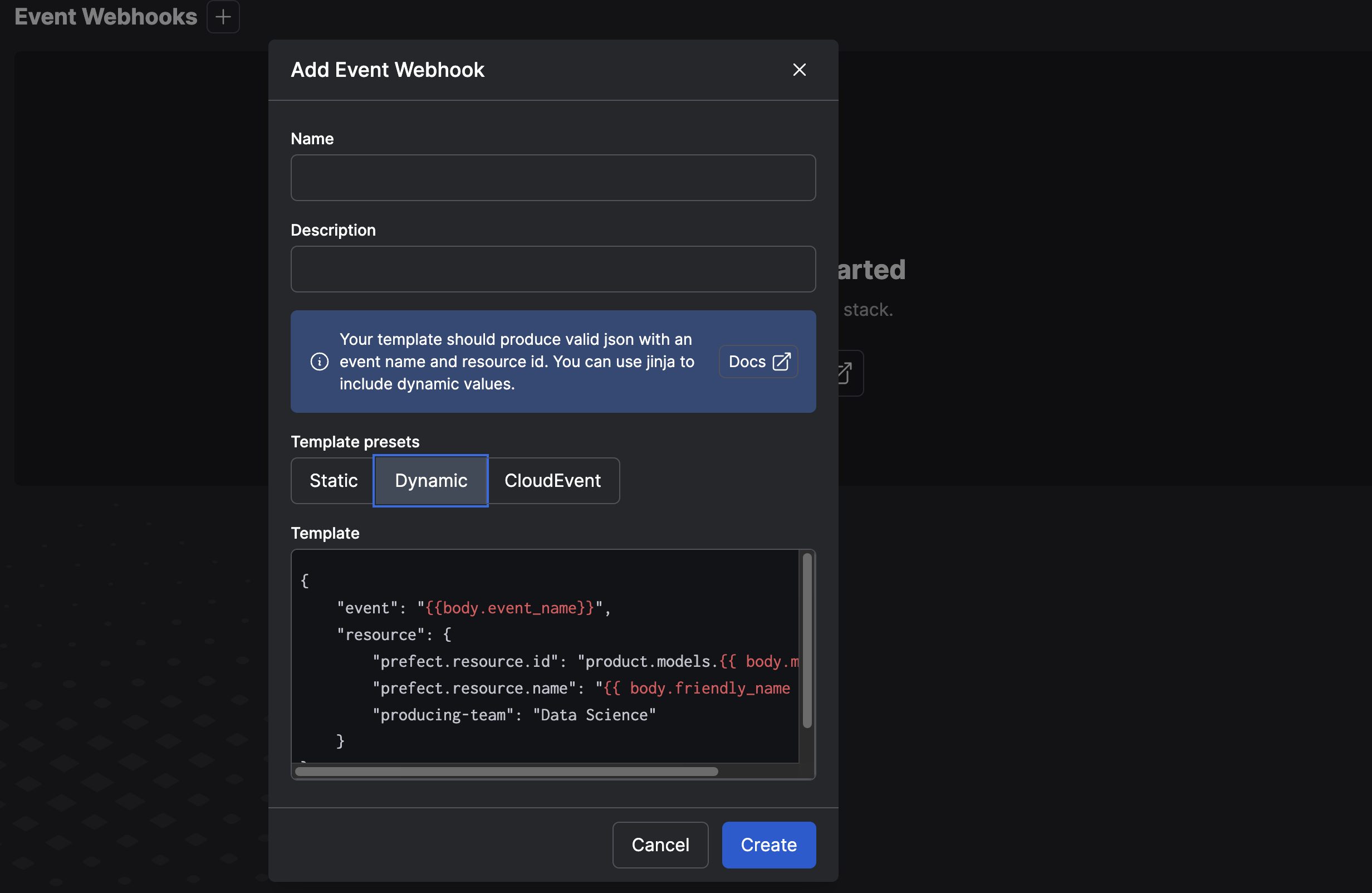
Use webhooks in your Prefect Cloud workspace to receive, observe, and respond to events
from other systems in your ecosystem. Each webhook exposes a unique URL endpoint to
receive events from other systems and transforms them into Prefect
events for use in automations.Webhooks are defined by two essential components: a unique URL and a template that translates incoming web requests to a
Prefect event.
Webhooks are managed through the Webhooks API
endpoints. This is a Prefect
Cloud-only feature. Authenticate API calls using the standard
authentication methods you use with Prefect
Cloud.
Note the template string, discussed in greater detail below.You can retrieve details for a specific webhook by ID using get, or optionally query
all webhooks in your workspace with ls:
# get webhook by IDprefect cloud webhook get <webhook-id># list all configured webhooks in your workspaceprefect cloud webhook ls
Disable an existing webhook without deleting it using toggle:
prefect cloud webhook toggle <webhook-id>Webhook is now disabledprefect cloud webhook toggle <webhook-id>Webhook is now enabled
Use rotate to generate a new, random endpoint if you’re concerned your webhook endpoint was compromised:
The webhook endpoints have randomly generated opaque URLs that do not divulge any
information about your Prefect Cloud workspace. They are rooted at
https://api.prefect.cloud/hooks/. For example:
https://api.prefect.cloud/hooks/AERylZ_uewzpDx-8fcweHQ.
Prefect Cloud assigns this URL when you create a webhook; it cannot be set through the API.
You may rotate your webhook URL at any time without
losing the associated configuration.All webhooks may accept requests with the most common HTTP methods:
Use GET, HEAD, and DELETE for webhooks that define a static event
template, or a template that does not depend on the body of the HTTP request. The
headers of the request will be available for templates.
Prefect Cloud webhooks are deliberately quiet to the outside world, and only return
a 204 No Content response when they are successful or a 400 Bad Request error when
there is any error interpreting the request. For more visibility when your webhooks
fail, see the Troubleshooting section below.
The purpose of a webhook is to accept an HTTP request from another system and produce a
Prefect event from it. You often have little control
over the format of those requests, so Prefect’s webhook system gives you full configuration
on how you turn those notifications from other systems into meaningful events in your
Prefect Cloud workspace. The template you define for each webhook determines how
individual components of the incoming HTTP request become the event name and resource
labels of the resulting Prefect event.As with the templates available in Prefect Cloud Automation for
defining notifications and other parameters, you write templates in
Jinja2. All of the built-in
Jinja2 blocks and filters are available, as well as the filters from the
jinja2-humanize-extensions
package.Your goal when defining an event template is to produce a valid JSON object that
defines (at minimum) the event name and the resource["prefect.resource.id"], which
are required of all events. The simplest template is one in which these are statically
defined.
Make sure to produce valid JSONThe output of your template, when rendered, should be a valid string that can be
parsed, for example, with json.loads.
Here’s a static webhook template example that notifies Prefect when your recommendations
machine learning model has been updated, so you can send a Slack notification to your team and run a few subsequent
deployments. Those models are produced on a daily schedule by another team that is
using cron for scheduling. They aren’t able to use Prefect for their flows yet, but
they are happy to add a curl to the end of their daily script to notify you. Because
this webhook is only used for a single event from a single resource, your template
can be entirely static:
A webhook with this template may be invoked through any of the HTTP methods, including a
GET request with no body, so the team you are integrating with can include this line at the
end of their daily script:
You only had to provide the event and resource definition, which
is not a completely fleshed out event. Prefect Cloud sets default values for any
missing fields, such as occurred and id, so you don’t need to set them in your
template. Additionally, Prefect Cloud adds the webhook itself as a related resource
on all of the events it produces.If your template does not produce a payload field, the payload defaults to a
standard set of debugging information, including the HTTP method, headers, and body.
Let’s say that after a few days you and the Data Science team are getting a lot of
value from the automations you have set up with the static webhook. You’ve agreed to
upgrade this webhook to handle all of the various models that the team produces. It’s
time to add some dynamic information to your webhook template.Your colleagues on the team have adjusted their daily cron scripts to POST a
small body that includes the ID and name of the model that was updated:
This script sends a POST request and the body will include a traditional
URL-encoded form with two fields describing the model that was updated: model and
friendly_name. Here’s the webhook code that uses Jinja to receive these values in your
template and produce different events for the different models:
All subsequent POST requests will produce events with those variable
resource IDs and names. The other statically-defined parts, such as event or the
producing-team label you included earlier, will still be used.
Use Jinja2’s default filter to handle missing valuesJinja2 has a helpful default
filter that can compensate for missing values in the request. In this example,
you may want to use the model’s ID in place of the friendly name when the friendly name is not
provided: {{ body.friendly_name|default(body.model) }}.
The Jinja2 template context includes the three parts of the incoming HTTP request:
method is the uppercased string of the HTTP method, like GET or POST.
headers is a case-insensitive dictionary of the HTTP headers included with the
request. To prevent accidental disclosures, the Authorization header is removed.
body represents the body that was posted to the webhook, with a best-effort approach
to parse it into an object you can access.
HTTP headers are available without any alteration as a dict-like object, but you may
access them with header names in any case. For example, these template expressions all
return the value of the Content-Length header:
The HTTP request body goes through some light preprocessing to make it more useful in
templates. If the Content-Type of the request is application/json, the body will be
parsed as a JSON object and made available to the webhook templates. If the
Content-Type is application/x-www-form-urlencoded (as in our example above), the
body is parsed into a flat dict-like object of key-value pairs. Jinja2 supports both
index and attribute access to the fields of these objects, so the following two
expressions are equivalent:
Only for Python identifiersJinja2’s syntax only allows attribute-like access if the key is a valid Python
identifier, so body.friendly-name will not work. Use body['friendly-name'] in
those cases.
Prefect Cloud will attempt to parse any other content type (such as text/plain) as if it were JSON first.
In any case where the body cannot be transformed into JSON, it is made available to your
templates as a Python str.
In cases where you have more control over the client, your webhook can accept Prefect
events directly with a simple pass-through template:
{{ body|tojson }}
This template accepts the incoming body (assuming it was in JSON format) and passes
it through unmodified. This allows a POST of a partial Prefect event as in this
example:
The Cloud Native Computing Foundation has standardized
CloudEvents for use by systems to exchange event information
in a common format. These events are supported by major cloud providers and a growing
number of cloud-native systems. Prefect Cloud can interpret a webhook containing
a CloudEvent natively with the following template:
{{ body|from_cloud_event(headers) }}
The resulting event uses the CloudEvent’s subject as the resource (or the source
if no subject is available). The CloudEvent’s data attribute becomes the
Prefect event’s payload['data'], and the other CloudEvent metadata will be at
payload['cloudevents']. To handle CloudEvents in a more specific
way tailored to your use case, use a dynamic template to interpret the incoming body.
The initial configuration of your webhook may require some trial and error as you get
the sender and your receiving webhook speaking a compatible language. While you are in
this phase, lean upon the event feed in the UI to see events as they happen.When Prefect Cloud encounters an error during receipt of a webhook, it produces a
prefect-cloud.webhook.failed event in your workspace. This event includes
critical information about the HTTP method, headers, and body it received, as well as
what the template rendered. Keep an eye out for these events when something goes wrong.
Was this page helpful?
Assistant
Responses are generated using AI and may contain mistakes.